
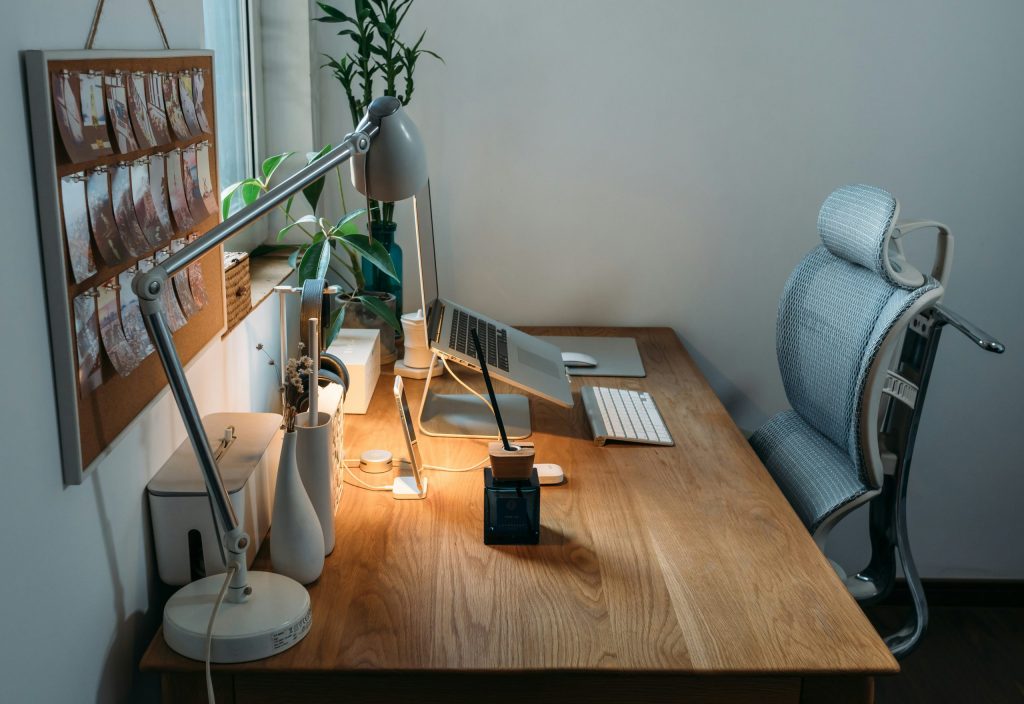
Struggling to stay focused and comfortable while working from home? An ergonomic workspace can make all the difference! Discover how to enhance your productivity and comfort with these essential tips for an ergonomic setup.
From the right chair to optimal screen placement, these insights are designed to help you create a work environment that supports your health and efficiency. Let’s dive into the top ten ergonomic setup tips for a productive remote work experience!
1. Invest in a High-Quality Office Chair – Best For Comfort
A good office chair is key to maintaining posture and preventing back pain during long hours of work. Look for chairs that offer lumbar support and adjustable features to fit your body perfectly.
Key Features:
- Adjustable height and armrests
- Lumbar support to enhance spine alignment
- Breathable fabric for comfort
Pros:
- Enhances posture
- Reduces risk of chronic pain
- Improves focus and productivity
Cons:
- Can be expensive
- Takes time to adjust
- May require assembly
2. Use a Standing Desk – Best For Flexibility
Incorporating a standing desk allows you to alternate between sitting and standing, reducing the risk of fatigue and discomfort. This flexibility can keep your energy levels up throughout the day.
Key Features:
- Height adjustable to switch positions easily
- Spacious work surface
- Durable construction
Pros:
- Encourages movement
- Can boost productivity
- Promotes better posture
Cons:
- May require adjustment period
- Not ideal for all tasks
- Can be costly
3. Optimize Monitor Height – Best For Eye Comfort
Positioning your monitor at eye level can prevent neck strain and eye fatigue. Ensure the top of your monitor is aligned with your eyes for the best viewing angle.
Key Features:
- Adjustable height stands
- Minimal tilting capabilities
- Wider screens for multitasking
Pros:
- Reduces neck pain
- Improves focus on screens
- Enhances visual comfort
Cons:
- Requires additional equipment
- Some setups may be limited
- Can clutter desk space
4. Keep Your Keyboard and Mouse Close – Best For Efficiency
Having your keyboard and mouse at a comfortable reach reduces strain on your arms and wrists. Position them within a range that allows for a natural wrist angle.
Key Features:
- Ergonomic mouse design
- Split or curved keyboard options
- Wrist support pads
Pros:
- Reduces wrist strain
- Improves typing posture
- Increases efficiency
Cons:
- May take time to adapt
- Can be costly
- Requires careful alignment
5. Adjust Your Lighting – Best For Reducing Eye Strain
Proper lighting is essential for minimizing eye strain and creating a comfortable work environment. Natural light is best, but if that’s not an option, consider investing in good desk lamps.
Key Features:
- Adjustable brightness levels
- Color temperature settings
- Compact designs for easy placement
Pros:
- Improves focus
- Reduces headaches
- Creates a pleasant work atmosphere
Cons:
- Can cause glare on screens
- May require multiple light sources
- Some lights can be harsh
6. Maintain a Neutral Wrist Position – Best For Preventing Injuries
Keeping your wrists in a neutral position while typing can prevent repetitive strain injuries. Use wrist rests or angle your keyboard properly for comfort.
Key Features:
- Non-slip pads
- Soft cushion material
- Ergonomic shapes
Pros:
- Prevents carpal tunnel syndrome
- Enhances typing comfort
- Supports forearm alignment
Cons:
- May require a learning period
- Not suitable for all keyboard types
- Can take up desk space
7. Use Footrests – Best For Circulation
A footrest can help improve circulation, especially if your feet don’t reach the ground comfortably in your chair. It also aids in keeping your posture aligned.
Key Features:
- Height adjustable designs
- Textured surfaces for stability
- Portable options available
Pros:
- Improves blood circulation
- Reduces pressure on feet
- Enhances overall comfort
Cons:
- Requires space under desk
- Can be overlooked in setup
- May need adjustment
8. Take Regular Breaks – Best For Mental Sharpness
Stepping away from your desk periodically is key to maintaining mental health and productivity. Schedule breaks to move around and rest your eyes.
Key Features:
- Easy-to-follow break schedules
- Mobile apps for reminders
- Guided exercises for quick refreshment
Pros:
- Reduces fatigue
- Promotes physical activity
- Improves focus upon return
Cons:
- Can be easy to forget
- May disrupt workflow
- Requires discipline to maintain
9. Use Blue Light Blocking Glasses – Best For Eye Protection
Investing in blue light blocking glasses can aid in reducing eye strain caused by prolonged screen time. They filter harmful blue light while enhancing visual clarity.
Key Features:
- UV protection
- Stylish frames
- Comfortable fit
Pros:
- Reduces eye strain
- Enhances sleep quality
- Available in various styles
Cons:
- May cause color distortion
- Can be pricey
- Requires adjustment period
10. Personalize Your Workspace – Best For Motivation
Creating a workspace that reflects your personality can boost motivation. Incorporate plants, art, or meaningful items that inspire you while you work.
Key Features:
- Incorporates plants for air quality
- Displays art or photographs for inspiration
- Arranges decorative items to enhance aesthetics
Pros:
- Increases motivation
- Creates a pleasant working environment
- Enhances creativity
Cons:
- May cause distractions
- Requires purchasing decor
- Available space limitation
How to Choose the Right Ergonomic Setup for You
When setting up your ergonomic workspace, consider your specific needs related to height, posture, and comfort. Test different configurations to find what feels best. Don’t hesitate to invest in quality products that support your health and productivity—your body will thank you!
#RemoteWork #Ergonomics #HomeOffice #WorkFromHome #ProductivityTips #HealthyWorkspace #OfficeSetup #ErgonomicTips